
Docs / Integrations
Verilive JavaScript SDK
A guide to integrating Web Liveness Verification
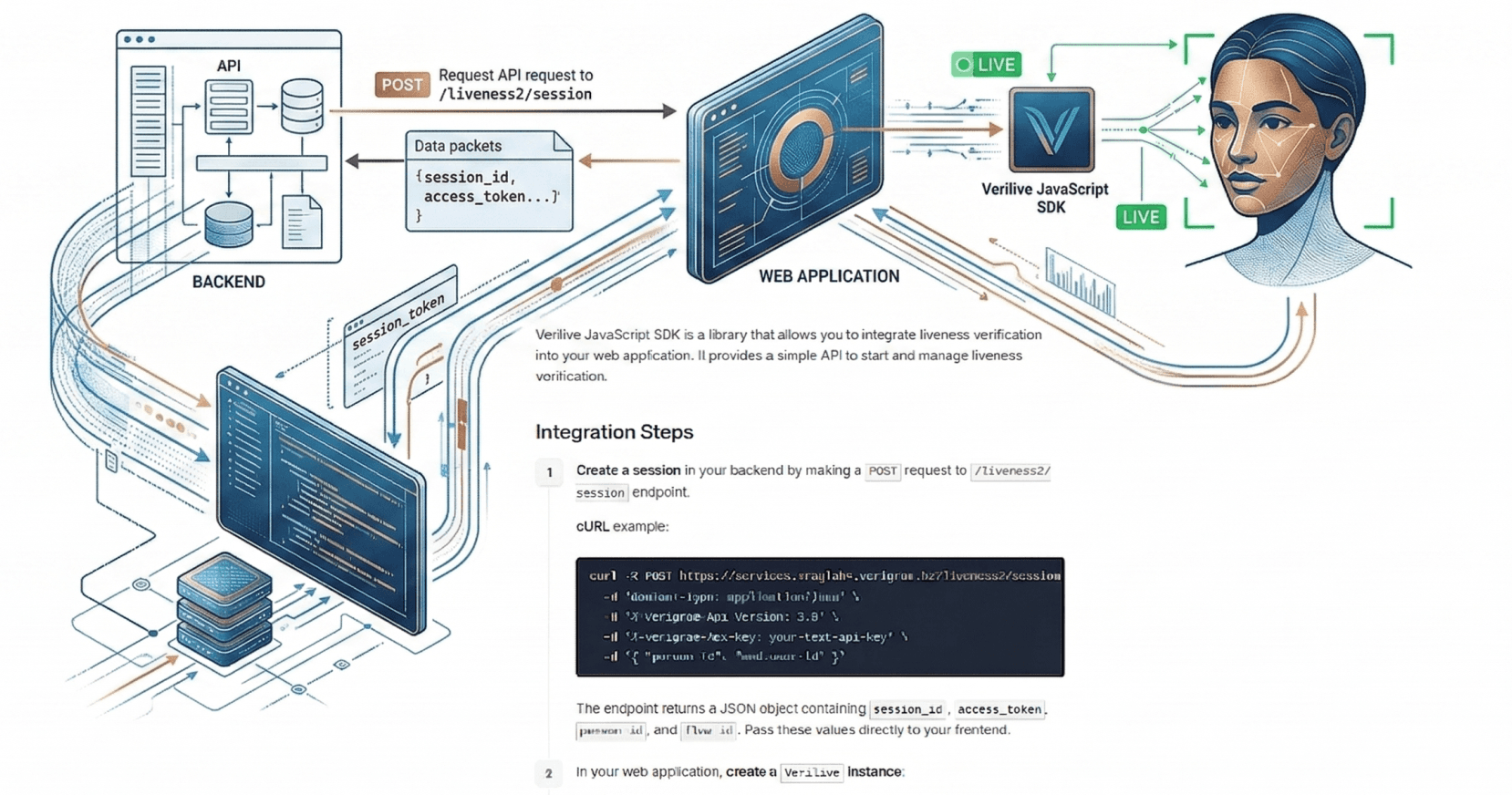
Verilive JavaScript SDK is a library that allows you to integrate liveness verification into your web application. It provides a simple API to start and manage liveness verification.
Integration Steps
Create a session in your backend by making a
POSTrequest to/liveness2/sessionendpoint.cURL example:
#!/usr/bin/env bash
API_URL="<API_URL>"
API_KEY="<your-api-key>"
API_SECRET="<your-api-secret>"
FLOW_ID="<your-flow-id>"
PERSON_ID="<your-person-id>"

### THE LINES BELOW DOES NOT REQUIRE ANY MODIFICATIONS ###

API_PATH="/liveness2/session"
TIMESTAMP=$(date +%s)
SIGNABLE_STR=$(echo -n -e "$TIMESTAMP$API_PATH")
HMAC_DIGEST=$(echo -n $SIGNABLE_STR | openssl sha256 -hmac "$API_SECRET" | cut -d' ' -f2)
DATA_JSON=$(cat <<-EOF
{
  "person_id": "$PERSON_ID",
  "flow_id": "$FLOW_ID"
}
EOF
)

curl -i -X POST "https://$API_URL$API_PATH" \
-H "Content-Type: application/json" \
-H "X-Verigram-Api-Version: 2.0" \
-H "X-Verigram-Api-Key: $API_KEY" \
-H "X-Verigram-Hmac-SHA256: $HMAC_DIGEST" \
-H "X-Verigram-Ts: $TIMESTAMP" \
-d "$DATA_JSON"
The endpoint returns a JSON object containing
session_id,access_token,person_id, andflow_id. Pass these values directly to your frontend.In your web application, create a
Veriliveinstance:import { Verilive, VeriliveError } from 'verilive-sdk'; const verilive = new Verilive();Call the
start()method on the Verilive instance using the parameters obtained from your backend. The SDK mounts directly into thenodeelement you provide (a sized container in your layout) — see Embedded mode.// A sized container already present in your page. const node = document.getElementById('liveness-container'); if (!node) throw new Error('Liveness container not found'); try { const result = await verilive.start({ baseUrl: <API_URL>, flowId: 'your-flow-id', accessToken: 'your-access-token', personId: 'your-person-id', sessionId: 'your-session-id', node, }); if (result.success) { console.log('Verification completed successfully'); // fetch the final result from your backend using flow_id } else { console.log('Verification failed:', result.errorCode); } } catch (error) { if (error instanceof VeriliveError) { console.error('SDK error:', error.code, error.message); } else { console.error('Unexpected error:', error); } }Handle the result and errors
The
start()method returns aVeriliveResultwith asuccessflag and an optionalerrorCode. Ifsuccessistrue, you must fetch the final verdict from your backend using theflow_id. The JavaScript SDK does not provide the liveness verdict directly. This behavior is deliberate; frontend results are not reliable and can be tampered with by an attacker.To get the results of the Flow, you need to make a
GETrequest to the endpoint/flow/{flow_id}/result.curl -X GET https://<API_URL>/flow/{flow-id}/result \ -H 'Content-Type: application/json' \ -H 'X-Verigram-Api-Version: 2.0' \ -H 'X-Verigram-Api-Key: <your-api-key>'
API Reference
Verilive class
Constructor
Creates and returns a new Verilive object.
Syntax:
new Verilive(options?)
Parameters:
options (optional) — An object used to configure the SDK. The available properties are:
language?: 'ru' | 'kz' | 'en'— Override the browser locale with a specific language (default: browser locale).
Example:
const verilive = new Verilive({
  language: 'en'
});
start() method
Initiates the liveness verification process. Returns a Promise that resolves with a VeriliveResult upon completion, or rejects with a VeriliveError if a critical SDK error occurs.
Only one simultaneous start() call is permitted across all Verilive instances. If start() is invoked while another session is already in progress, the SDK will reject the call and throw a VeriliveAlreadyStartedError.
Syntax:
start(params: {
  flowId: string;
  accessToken: string;
  personId: string;
  sessionId: string;
  baseUrl?: string;
  attemptsLeft?: number;
  showStartScreen?: boolean;
  showResultScreen?: boolean;
  language?: 'ru' | 'kz' | 'en';
  node: HTMLElement;
  onRetry?: (params: OnRetryParams) => Promise<RetryData>;
}): Promise<VeriliveResult>
Parameters:
params — An object containing session and UI configuration:
node: HTMLElement— Required. The DOM element the SDK mounts into directly. The host owns the element's sizing and placement; the SDK fills it 100%. The element must be attached to the current document and must not be inside a Shadow DOM. Ifnodeis missing,start()throws aVeriliveInternalError. See Embedded mode for details.flowId: string— Required. The unique identifier for the verification flow, obtained from your backend.accessToken: string— Required. Authentication token obtained from the backend to authorize the session.personId: string— Required. The unique identifier for the individual undergoing verification.sessionId: string— Required. A unique ID for the current attempt.Note: Do not rely on this ID for final results; use
flowIdas it remains constant across retries.baseUrl?: string— Optional. Override the default API URL. Required for on-premises deployments.attemptsLeft?: number— Optional. Number of retry attempts allowed. When set, after all attempts are exhausted thestart()promise resolves with{ success: false }and the correspondingerrorCode. When not set, retry is managed by theonRetrycallback or the server.showStartScreen?: boolean— Optional. Whether to display the instruction screen before starting (default:true).showResultScreen?: boolean— Optional. Whether to show success/failure feedback screens (default:true).language?: 'ru' | 'kz' | 'en'— Optional. Override the language set in the constructor for this session.onRetry?: (params: OnRetryParams) => Promise<RetryData>— Optional. Callback for consumer-managed retry. Called when the user clicks retry. Must return new session credentials. If not provided, the SDK handles retry internally.
Return value:
Promise<VeriliveResult>— Resolves with{ success: boolean; errorCode?: string }.
Example:
const result = await verilive.start({
  flowId: 'your-flow-id',
  accessToken: 'your-access-token',
  personId: 'your-person-id',
  sessionId: 'your-session-id',
  baseUrl: 'https://liveness.company.com/',
  showStartScreen: false,
  showResultScreen: false,
  node: document.getElementById('liveness-container')!,
});

if (result.success) {
  // Fetch the final verdict from your backend
} else {
  console.log('Failed with error:', result.errorCode);
}
unmount() method
Unmounts the SDK if it is currently running. This interrupts the active liveness process and cleans up all associated resources. If a start() call is still in progress, the associated Promise will be rejected with a VeriliveUnmountedError.
Syntax:
unmount(): void
Example:
setTimeout(() => {
  verilive.unmount();
}, 1000);

try {
  await verilive.start({ flowId, accessToken, personId, sessionId, node });
} catch (error) {
  // error will be a VeriliveUnmountedError after 1 second
}
Error Handling
The SDK has two levels of errors:
Thrown errors (caught with
try/catch) — critical SDK failures where the process cannot continue.Result errors (returned in
VeriliveResult.errorCode) — business-level errors from the liveness process. The SDK flow completed normally but verification did not pass.
Thrown Errors (Critical)
These errors indicate that the SDK itself encountered a critical problem. They are thrown as exceptions and should be caught with try/catch.
All SDK errors extend from VeriliveError, which includes the following properties:
code:string— A unique identifier for the specific error type.message:string— A human-readable description of the error.
VeriliveAlreadyStartedError
Thrown when start() is invoked while a previous verification is still in progress.
Code:
ALREADY_STARTED
VeriliveCancelledByUserError
Thrown when the user manually cancels the verification (e.g., by pressing the browser back button or Escape key).
Code:
CANCELLED_BY_USER
VeriliveInternalError
Thrown when an internal SDK error occurs, typically due to environment issues or unexpected failures.
Code:
INTERNAL_ERRORCommon Causes:
The
document.bodyis not available at the time of initialization.The required
nodeelement was not provided tostart().Required browser APIs (like
MediaDevices) are missing or restricted.
VeriliveUnmountedError
Thrown when unmount() is called while a verification is in progress.
Code:
UNMOUNTED
Container errors
Thrown synchronously from start() when the provided node is invalid. Both extend VeriliveError.
Code:
CONTAINER_NOT_IN_DOM—nodeis not attached to the current document.Code:
CONTAINER_IN_SHADOW_DOM—nodeis inside a Shadow DOM, which breaks session recording.
A missing node throws a VeriliveInternalError (INTERNAL_ERROR) instead.
Example:
try {
  const result = await verilive.start({
    flowId, accessToken, personId, sessionId, node,
  });
  // handle result...
} catch (error) {
  if (error instanceof VeriliveError) {
    switch (error.code) {
      case 'ALREADY_STARTED':
        console.error('A verification is already in progress');
        break;
      case 'CANCELLED_BY_USER':
        console.log('User cancelled the verification');
        break;
      case 'INTERNAL_ERROR':
        console.error('Internal SDK error:', error.message);
        break;
      case 'UNMOUNTED':
        console.log('SDK was unmounted');
        break;
    }
  }
}
Result Errors (Business)
These errors are returned in VeriliveResult.errorCode when start() resolves (not throws). The SDK flow completed normally, but the liveness check did not pass.
Error Code | Description |
|---|---|
| The liveness check did not pass. The user's face was not verified as live. |
| The backend returned an error response during the verification process. |
| A network connectivity issue prevented the verification from completing. |
Example:
const result = await verilive.start({
  flowId, accessToken, personId, sessionId, node,
});

if (result.success) {
  console.log('Verification passed');
} else {
  switch (result.errorCode) {
    case 'LIVENESS_FAILED':
      console.log('Liveness check failed');
      break;
    case 'SERVER_ERROR':
      console.error('Server error during verification');
      break;
    case 'NETWORK_ERROR':
      console.error('Network error during verification');
      break;
  }
}
Retry Handling
The SDK supports two retry modes:
SDK-managed retry (default)
When the liveness check fails and attemptsLeft > 0, the SDK automatically shows a retry screen and handles the retry internally via the server endpoint.
const result = await verilive.start({
  flowId, accessToken, personId, sessionId, node,
  attemptsLeft: 3,
});
Consumer-managed retry
Provide an onRetry callback to handle retry logic yourself. The callback receives the current session info and must return new session credentials.
const result = await verilive.start({
  flowId, accessToken, personId, sessionId, node,
  onRetry: async ({ sessionId, errorCode, attemptsLeft }) => {
    // Request new session credentials from your backend
    const response = await fetch('/api/retry-session', {
      method: 'POST',
      body: JSON.stringify({ sessionId }),
    });
    const data = await response.json();

    return {
      sessionId: data.sessionId,
      accessToken: data.accessToken,
      attemptsLeft: data.attemptsLeft,
    };
  },
});
Embedded mode
The SDK mounts its UI directly into a DOM element you provide via node — no iframe, no postMessage. This lets the verification UI live inside your own layout (a card, a panel, a route) instead of a full-screen modal.
node is required. The host owns the element's sizing and placement; the SDK fills it 100%.
Requirements for node
Must be an
HTMLElementinstance attached to the currentdocument. A detached element throwsCONTAINER_NOT_IN_DOM.Must not be inside a Shadow DOM. The SDK throws
CONTAINER_IN_SHADOW_DOMbecause session recording (used for incident replay) cannot see across shadow boundaries.You own its size. Give it an explicit height (or a flex/grid/absolute box). If the element resolves to ~0px height, the SDK falls back to a full-screen overlay so the camera view doesn't collapse.
Example
import { Verilive, VeriliveError } from 'verilive-sdk';

const verilive = new Verilive({ language: 'en' });

// A sized container the SDK will mount into.
const container = document.getElementById('liveness-container'); // e.g. 480×700
if (!container) throw new Error('Liveness container not found');

const result = await verilive.start({
  flowId,
  accessToken,
  personId,
  sessionId,
  node: container,
});

if (result.success) {
  // Fetch the final verdict from your backend
} else {
  console.log('Failed with error:', result.errorCode);
}
In React, hold the container with a ref and pass ref.current as node:
const containerRef = useRef<HTMLDivElement | null>(null);

const start = async () => {
  const node = containerRef.current;
  if (!node) return;

  await verilive.start({ flowId, accessToken, personId, sessionId, node });
};

// <div ref={containerRef} style={{ width: 480, height: 700 }} />
Usage Examples
React Example
import { useRef } from 'react';
import { Verilive, VeriliveError } from 'verilive-sdk';

const verilive = new Verilive({ language: 'en' });

function App() {
  const containerRef = useRef<HTMLDivElement | null>(null);

  const startVerification = async () => {
    const node = containerRef.current;
    if (!node) return;

    try {
      const response = await fetch('/api/get-verification-credentials');
      const { flowId, accessToken, personId, sessionId } = await response.json();

      const result = await verilive.start({
        flowId, accessToken, personId, sessionId, node,
      });

      if (result.success) {
        console.log('Verification passed');
      } else {
        console.log('Verification failed:', result.errorCode);
      }
    } catch (error) {
      if (error instanceof VeriliveError) {
        console.error('SDK error:', error.code, error.message);
      }
    }
  };

  return (
    <div>
      <button onClick={startVerification}>Start Verification</button>
      <button onClick={() => verilive.unmount()}>Stop</button>
      {/* The SDK mounts here. The host owns its size. */}
      <div ref={containerRef} style={{ width: 480, height: 700 }} />
    </div>
  );
}
Vanilla JavaScript Example
import { Verilive, VeriliveError } from 'verilive-sdk';

const verilive = new Verilive({ language: 'en' });

async function startVerification() {
  // A sized container the SDK will mount into.
  const node = document.getElementById('liveness-container');
  if (!node) return;

  try {
    const response = await fetch('/api/get-verification-credentials');
    const { flowId, accessToken, personId, sessionId } = await response.json();

    const result = await verilive.start({
      flowId, accessToken, personId, sessionId, node,
    });

    if (result.success) {
      console.log('Verification passed');
    } else {
      console.log('Verification failed:', result.errorCode);
    }
  } catch (error) {
    if (error instanceof VeriliveError) {
      console.error('SDK error:', error.code, error.message);
    }
  }
}

document.getElementById('startButton').addEventListener('click', startVerification);
History Management
The SDK manages the browser history to provide a seamless user experience. Understanding this mechanism is essential for proper integration with your application's routing.
How It Works
When the start() method is invoked, the SDK pushes a new entry onto the browser's history stack. When the liveness process is completed, canceled, or manually interrupted, the SDK automatically restores the previous history state.
If the user presses the browser Back button during the verification process, the SDK intercepts the navigation, cancels the verification, and rejects the start() promise with a VeriliveCancelledByUserError.
State Transitions
Successful Verification Completion. The SDK ensures the history returns to a clean state after the callback is executed.
Manual Unmount. If
unmount()is called, the SDK manually rolls back the history stack to the state existing prior to initialization.Browser Back Button. Pressing "Back" triggers a natural
popstateevent which the SDK uses to clean up and reject the pending promise with aVeriliveCancelledByUserError.
TypeScript Support
The SDK includes TypeScript type definitions. Import types as needed:
import {
  Verilive,
  VeriliveError,
  type VeriliveConfig,
  type StartParams,
  type VeriliveResult,
  type OnRetryParams,
  type RetryData,
} from 'verilive-sdk';

const config: VeriliveConfig = {
  language: 'en',
};

const verilive = new Verilive(config);Was this helpful?